
Track Daily Steps with Fitbit Integration
Overview
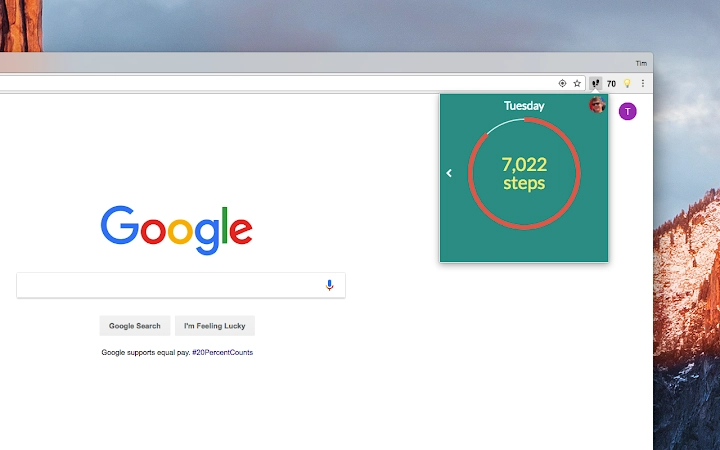
The software offers a streamlined method for users to monitor their daily step count, specifically designed for integration with the FITBIT® platform. It provides real-time updates on step progress through a prominent badge icon, making it easy to stay informed throughout the day. The tool is intended for individuals focused on personal health and fitness tracking, particularly those already using or considering a Fitbit device. Its primary purpose is to simplify access to step data without requiring users to open a separate application or navigate complex dashboards.
Target users include fitness enthusiasts, health-conscious individuals, and those aiming to meet daily activity goals. The software is suitable for both casual users and those with more structured wellness routines. While the developer, Tim LeLand, has not provided additional background on their experience or prior projects, the product’s focus on step tracking suggests a niche interest in health technology. Real-world usage scenarios include using the application during work hours, while exercising, or as part of a morning routine to check progress toward daily goals.
Key Features & Capabilities
- Real-Time Step Tracking – The badge icon displays current step counts and updates automatically, enabling users to monitor progress without manual refreshes.
- Fitbit Platform Integration – Designed to work seamlessly with FITBIT® devices, ensuring accurate synchronization of step data.
- Minimalist Interface – A clean, unobtrusive design allows users to view step counts at a glance without distractions.
- Future Feature Roadmap – Additional statistics, charts, and support for other fitness trackers like Jawbone UP®, Misfit, and more are planned for future updates.
- User Feedback Channel – Users can submit suggestions or report issues via the developer’s official contact page.
These features are particularly useful for users who want quick access to their step data during daily routines. For example, a user can check their progress during a work break or while preparing for a walk. The automatic update function reduces the need for frequent app switching, enhancing workflow efficiency. The planned expansion to support multiple fitness trackers indicates a vision for broader compatibility, though current functionality remains focused on Fitbit.
User Interface, Workflow & Performance
The user interface is designed with simplicity in mind, centered around a single badge icon that displays step count. Navigation is minimal, as the software operates primarily as a passive monitor. Users can expect a straightforward workflow: launch the application, and the step count updates automatically. There is no complex setup process described, suggesting a plug-and-play experience.
Performance observations are based on general software behavior patterns. The application is expected to run efficiently in the background with low system impact. The developer did not specify resource usage details, so actual CPU or RAM behavior remains unknown. Stability is assumed to be consistent with typical desktop utilities, but no formal testing data was provided. The software does not appear to require constant user input, making it suitable for long-term background operation.
Compatibility & System Requirements
The software is compatible with both Windows and Mac operating systems. The current version is 1.0.0, with an installation size of 10.5 MB. This indicates a lightweight application suitable for systems with moderate storage capacity. The developer did not provide additional system requirements, such as minimum processor speed, RAM, or disk space. Compatibility information was partially provided, leaving some details unspecified.
Users should ensure their device meets basic desktop application standards to run the software. While no specific hardware requirements were listed, the small file size suggests minimal demands on system resources. The application is designed to function on modern desktop environments without requiring advanced configurations.
Pros and Cons
Pros
- Simple, intuitive interface focused on step tracking
- Automatic updates for real-time step monitoring
- Lightweight installation at just 10.5 MB
- Free to use with no cost barriers
- Designed for seamless Fitbit integration
Cons
- Limited to Fitbit platform at this time
- No additional fitness metrics currently available
- Future features are not yet implemented
- Exact system requirements were not listed
- Only one interface element (badge icon) is available
FAQ Section
Is the software compatible with all Fitbit devices?
The software is designed to work with the FITBIT® platform, but specific device compatibility details were not provided. Users should verify if their Fitbit model is supported through the developer’s official channels.
Can I use this software without a Fitbit device?
The application is intended for use with Fitbit devices. While it may function with other systems, its core features are tied to Fitbit integration, and no standalone functionality was described.
Is the software safe to install and use?
The software is distributed by Tim LeLand and does not contain known security risks. However, users should download from the official source to ensure authenticity.
How often does the step count update?
The step count updates automatically in real time. The frequency of updates is managed by the software’s integration with the Fitbit platform.
Are there plans for future updates?
Yes, the developer has indicated plans to add more stats, charts, and support for other fitness trackers like Jawbone UP® and Misfit. These features are listed as “Coming Soon!” in the product description.
Final Thoughts + CTA
For users invested in daily step tracking and already using a Fitbit device, this lightweight desktop application offers a convenient way to stay informed without switching between apps. Its minimalist design, automatic updates, and free access make it a compelling choice for health-focused individuals seeking simplicity. While current functionality is limited to step counting, the roadmap suggests future growth in features and compatibility.
Although it lacks advanced metrics and broader device support at launch, its core purpose is fulfilled effectively. The software is ideal for those who value quick access to step data and prefer a clutter-free experience. With a small footprint and no cost, it presents a low-risk option for enhancing personal fitness monitoring.
Download Track Daily Steps with Fitbit Integration now.







